A Wave alternative for Canadian online sellers
Wave is a Canadian bookkeeping app with a free starter plan, built around invoicing. Talisk HQ is built for the online seller: payouts reconciled, sales tax by province, and bills and receipts read from your inbox. Here is the honest difference.
If you sell on Shopify, a payout is not revenue. It is sales, less refunds, less fees, landing days later as one deposit. Untangling that is where most of a seller's bookkeeping time goes, and it is the part a general invoicing app leaves to you.
Talisk starts from your inbox and your store instead. It reads the invoices and receipts that already arrive in your inbox, books your store's payouts as they settle, posts them as real double-entry, and keeps the books current. Your data stays yours: export to QuickBooks, Xero, IIF or xlsx whenever you want. Wave's free plan is a real win on price, and the table says so. It also says where the two differ.
| Feature | Talisk HQ | Wave |
|---|---|---|
| Built for | Canadian online sellers | Invoicing-led small businesses, with a free starter plan |
| Free plan | Yes. What each plan includes is on the pricing page | Yes, and it is a real one: unlimited invoices, estimates and bookkeeping records |
| Ecommerce payouts | Native. Shopify, WooCommerce, Stripe, Square & PayPal payouts posted and matched to the bank deposit | Shopify connects through Make.com on the Pro plan; Amazon and Etsy connect directly on Pro |
| Getting bills and receipts in | Read from your inbox, as they arrive | Receipt capture is included in Pro, or a CA$11 / month add-on on the free plan |
| Bank connections | Bank feeds through Plaid, plus statement import | Automatic import on Pro only, through Plaid. Not every bank is supported |
| Canadian sales tax | GST / HST / PST / QST by province, with a filing worksheet | Sales taxes supported; you pick the tax on each transaction |
| Where a number came from | Click any figure and read the email, payout or bank line behind it | Transactions and attachments you add |
| Month-end and year-end | Close the month, lock the period, and produce the reporting pack plus working papers | Standard reports |
| Payroll | None. Pair HQ with a payroll service | Yes: CA$25 / month plus CA$6 per person, every province except Quebec |
| Invoicing | Yes, including invoices drafted from an email or your own notes | Yes, a core strength, with online payments (card fees apply) |
| Works with an accountant | Invite them in, or export to QuickBooks, Xero, IIF or xlsx | Accountant access on the free plan |
| Availability | Closed beta. Request access | Open sign-up today |
| Starts at | Free, then $79 to $129 CAD / month | Free, then CA$25 / month for Pro |
Wave is a trademark of Wave Financial Inc. Wave plans, prices and features checked on 19 October 2026 from Wave's published pages and may have changed since. Not affiliated with or endorsed by Wave.
The payout is already reconciled
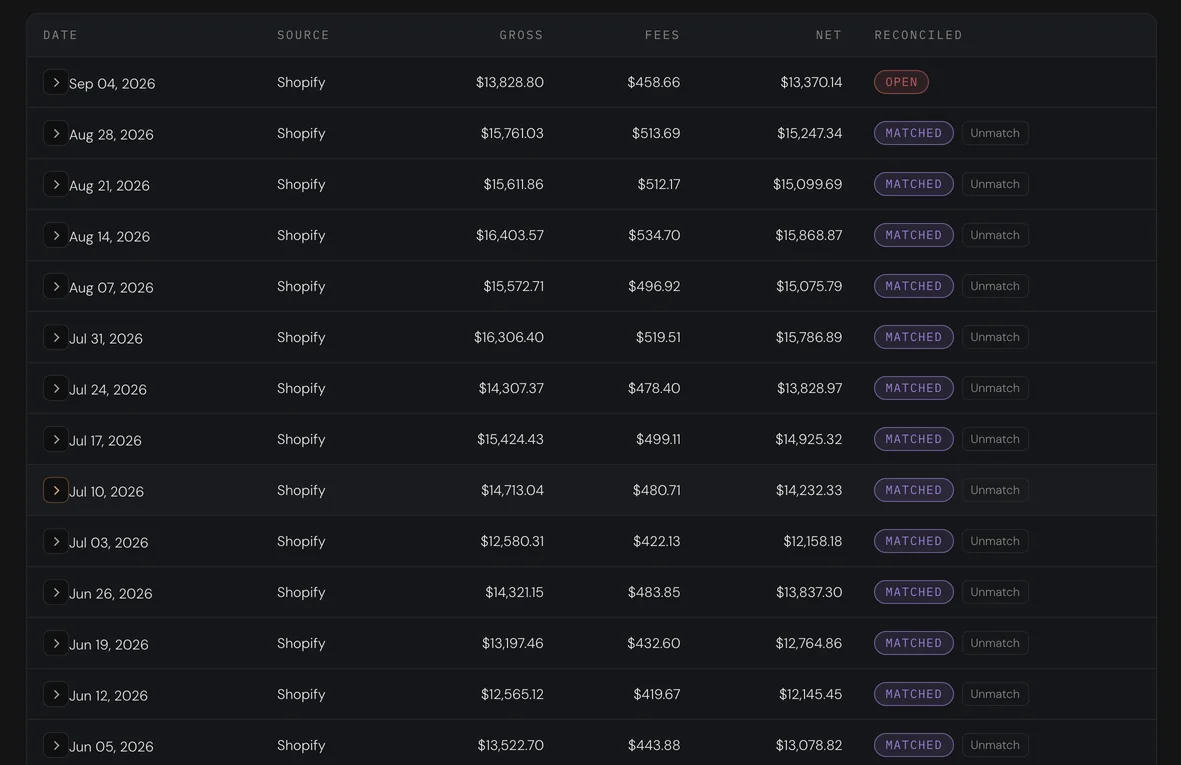
Talisk posts each Shopify, WooCommerce, Stripe, Square or PayPal payout to the general ledger and matches it to the bank line, with no automation service to configure.
Ledger › Ecommerce › Payouts, on the demo books.
Open the figure, find the email
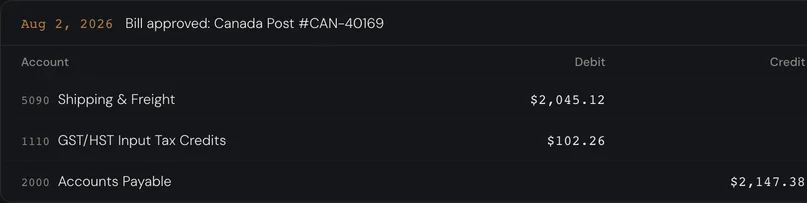
A shipping cost on the profit and loss opens into the entry that posted it, and that entry opens into the Canada Post email it arrived on. Nothing was attached by hand.
Real screens, over a real set of books.


When Talisk is the better choice
If this is your business, you will feel it quickly
- You sell on Shopify or WooCommerce in Canada and want payouts reconciled without an automation service in between
- Your supplier bills and receipts already pile up in your inbox
- You sell across provinces and want GST, HST, PST and QST handled by province
- You want a month-end close and working papers your accountant can use as they are
- You do not need payroll in the same app, or you already use a payroll service
- You want to know what you made this month, not in April
See it on your own numbers
Ask for a place in the closed beta, or explore the live demo. No signup, no card.